Facebook privacy - how to stay (a bit) safer on Facebook:
All social networking/blogging services exposes you in ways that can be very difficult to foresee and even harder to reverse.
However, if you can’t resist the urge to use Facebook, at least make it MORE secure than it by default is.
Install a FREE add-on for your Mozilla browser called Adblock Plus. After you have done that, add a filter subscription called "Facebook Privacy List".
Just to make sure you are on the safe(er) side, also install the FREE "Facebook disconnect" add-on.
https://addons.mozilla.org/en-US/firefox/addon/adblock-plus/
http://www.squirrelconspiracy.net/abp/facebook-privacy-list.html
https://addons.mozilla.org/en-US/firefox/addon/fbdc/
We also encourage you to carefully read the advises provided to you in the links below. You will find useful information on how to change your privacy settings, so that your posts will be visible only to people YOU choose.http://www.wikihow.com/Keep-Safe-on-Facebook
http://www.techspot.com/guides/280-manage-facebook-privacy-settings
http://www.readwriteweb.com/archives/5_easy_steps_to_stay_safe_and_private_on_facebook.php
http://www.makeuseof.com/tag/the-complete-guide-to-facebook-privacy/
http://www.ehow.com/how_2224767_stay-safe-facebook.html
Software to avoid (for security reasons):
1. Super Hide IP (all known
versions) - not a secure program at all. It may look classy and it
may appear as if your IP is hidden, but it´s not. All it does is provide you
with “transparent
proxies” 8 out of 10 times which, from a security perspective, makes this software completely pointless
to use in the first place. It’s like masking your face
with sunglasses rather than wearing a real mask that covers your whole face. Check your true anonymity at http://www.dnsleaktest.com/
2. MSN Messenger.
3. Yahoo
Messenger.
4. Mirc.
5. Any kind of screensaver or “Smiley software".
About:
"The Startpage search engine" - Startpage offers search-results from Google in complete privacy. https://startpage.com/ 
When
you search for information with Startpage, all identifying information from
your query is removed and submitted anonymously to Google. Your IP address is never recorded, your visit is not logged, and no tracking cookies are placed on your browser, unlike when you use Google.
http://www.washingtonpost.com/wp-dyn/content/article/2007/06/09/AR2007060900840.html Used together with other products listed in this FAQ, the Startpage search engine provides yet an additional layer of anonymity when surfing the net.
"WinZip" and "WinRAR" - Great
tools for many things but do NOT trust their encryption for protecting your
truly
important files. Use PGP for that instead. www.pgp.com www.symantec.com
OR www.pgpi.org
Web based, FREE to use, non-transparent proxies, that actually work can be hard to come by nowadays but below are a few that worked fine, when tested on August 20, 2012:
http://anonymouse.org/anonwww.html
http://invisiblesurf.net/proxy.php
http://www.guardster.com/free/
To test your proxy simply visit any, or all, of the below websites:
http://www.cybersyndrome.net/evc.html
https://xerobank.com/tools/anonymity-checker
http://iptoolchest.com/AnonymityCheck.aspx
http://tools-on.net/privacy.shtml


How to send anonymous Emails without having to sign up for an actual Email account:
You can use the
"Anonymouse" service for sending FREE anonymous
Emails without the need of an actual Email address. http://anonymouse.org/anonemail.html
You can also use the service at https://www.awxcnx.de/mm-anon-email.htm
Combined with the use of a VPN server, as described in the VPN and Bittorrents section in this FAQ, this is the ultimate solution to sending 100% anonymous Emails.
NOTE: To ensure maximum protection, it may take up to 12 hours for your Email(s) to be delivered.
I'm using a legal version of
Windows 7 but recently I've been getting this really weird message saying: "Your version of Windows is
illegal. You might be a victim of counterfeit!" How can I solve this?
This is easy to fix. Simply install “Windows 7 Loader eXtreme Edition” which can be downloaded from:
http://thepiratebay.org/torrent/5621974/Windows_7_Loader_eXtreme_Edition_v3.503-NAPALUM_DiBYA
NOTE : In your firewall settings, please BLOCK all traffic for BOTH directions, in
the"configure rules and zones" or similar for the program
"WatAdminSvc.exe" located in C:\Windows\System32\Wat\WatAdminsvc.exe since this .exe file allows Microsoft to check if an installed OS is legal or not. If you know you have a legal version installed but keep getting error messages saying it´s not legal, just block this .exe file from connecting to the Internet and you will not receive any further error messages.
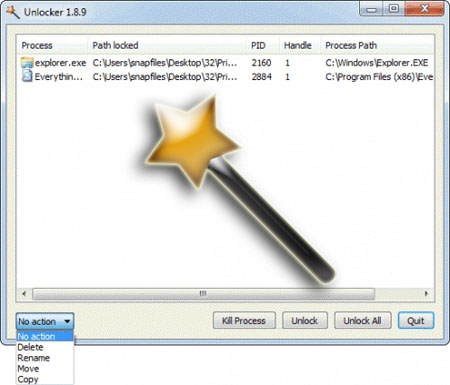
How to delete a file when:
- You suspect a file has a virus or Trojan but Windows doesn’t allow deletion
- Windows says 'file access denied'.
- 'File in use' error.
- Can't delete a file because (insert whatever cryptic reason).
- Rebooting doesn't help delete the file.
To fix any of the above mentioned problems, simply download "Unlocker 1.9" for FREE at www.emptyloop.com/unlocker

About Bluetooth:
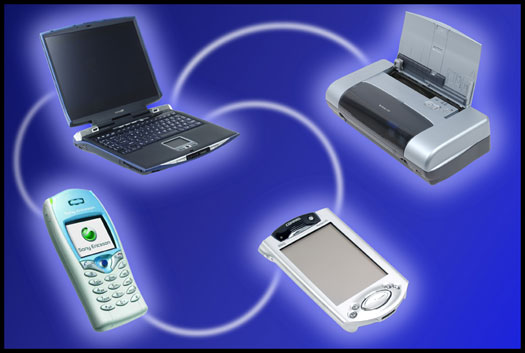
When a BT (Bluetooth) device is discoverable, it is very easy to scan for it using a computer and download private data. Setting Bluetooth to a "non-discoverable" mode prevents BT devices from appearing on the list during a BT device search process. However, it is still visible to those devices and users who are familiar with its Bluetooth MAC address, which would be the case for previously paired devices (devices that have communicated with each other at least once before).
Always turn off Bluetooth when it's not in use. Hackers can
use Bluetooth to steal personal information and install malicious software. Whether on a computer or on a cellphone, please be
aware that, for instance, Bluetooth headsets can easily be eavesdropped on, allowing criminals
to record your conversations easily. Many people unfortunately overlook this and other vulnerabilities.
About e-Passports:

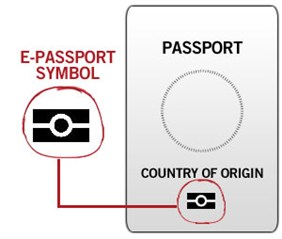
All the new e-passports are equipped with embedded so called “RFID
chips”, which contain personal information that attackers can read wirelessly
from distance, and use it to clone your passport. Many people do not realize this.
To make wireless reading of passport-content without an owner’s consent, a bit more difficult, e-passports use a mechanism called Basic Access Control (BAC). The approach means that in order to read data from the RFID chip you need to optically read a key, printed in passports. This key is based on a passport serial number. Subsequent communication between a passport and a reader is then encrypted to prevent eavesdropping. All EU passports implement BAC.
Weaknesses in the encryption mechanism used in BAC, in withstanding brute force attacks, have repeatedly been reported.
The latest research uncovers a different shortcoming - the possibility that thieves could use technology to detect the presence and nationality of passports in a crowd, the sort of information that might be useful for a hi-tech pickpocket.
Always use an "RFID blocking
passport wallet" to keep your information safe. It's well worth the money!

Additional hardware/software that can help you keep your computer a bit safer from intruders, by using biometric security such as a fingerprint reader or facial recognition software:
http://www.biometric-control.co.uk/
http://www.netbookreviews.com/veriface-review/
http://download.cnet.com/KeyLemon/3000-2348_4-10973375.html
NOTE: Using biometric software/hardware will NEVER - on its own - keep you 100 % safe. It is ONLY to be used as an additional layer of security. Please make sure you always use Whole Disk Encryption software such as PGP as basic security for your desktop/laptop.


What's the difference between AES and RSA encryption?
AES is a symmetric cryptographic algorithm, while RSA is an asymmetric (or public key) cryptographic algorithm. Encryption and decryption is done with a single key in AES, while you use separate keys (public and private keys) in RSA. The strength of a 128-bit AES key is pretty much equivalent to a 2600-bits RSA key.
You can hit F8 several times upon reboot and if that doesn't work you can open up the start menu in Windows and in the search box simply type "msconfig" without the " " and hit the enter key. Then, select the Boot tab, check the box for “Safe boot” and make sure the radio button below it is set to “Minimal”.
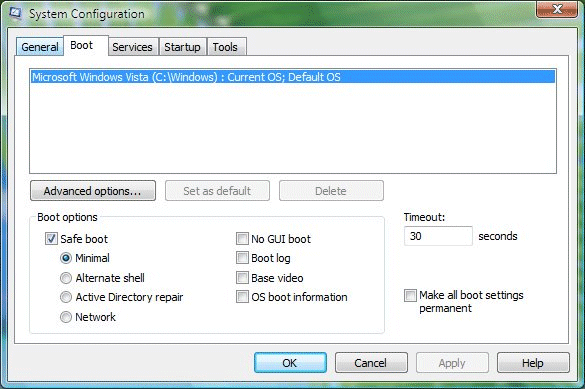
Once you hit the "OK" button you’ll be asked if you want to "restart now" or wait until later. Either way, the next boot will indeed take you into safe mode. Once you are done fixing whatever you were working on, you’ll probably want to turn safe mode off again and go back to normal mode. How to do that, you ask? Just open up msconfig the same way as before and then on the Boot tab simply uncheck the “Safe boot” check-box.
This above method is helpful especially if you need to repeatedly boot into Safe mode.
How to back up the registry on your Windows computer before editing its values:
To perform a back up of the registry is easy, but you must be logged on as "Administrator" to perform the below steps. If you aren't logged in as an administrator, you can only change settings that apply to your specific user account.
Before you make changes to a registry key or subkey, it is recommended that you export, or make a backup copy, of the key or subkey. You can save the backup copy to whichever location you specify, such as a folder on your hard disk or a removable storage device such as a USB. If you make changes that you want to undo, you can import the backup copy.
-
Open the Registry Editor by clicking the Start button
 . Then type "regedit", without the " ", into the search box and press Enter.
 If you're prompted for an administrator password or confirmation, type the password or provide confirmation.
 -
Locate and click the key or subkey that you want to back up.
-
Click the File menu, and then click Export.
-
In the Save in box, select the location where you want to save the backup copy to, and then type a name for the backup file in the File name box.
-
Click Save.

BIOS passwords, how to set one up and how to crack them:
When you start your computer, BIOS is the first program that is run.
You can tell the BIOS to ask for a password when it starts, thus restricting access to your computer. To enter the BIOS setup program, sometimes called CMOS setup, simply turn on or reboot your computer. The screen will display a series of diagnostics and a memory check. A message like "Hit the <DEL> key to enter the BIOS setup program" will appear. Hit the DEL key a few times and a BIOS menu appears.
Your BIOS menu will, depending on what kind of motherboard you are using, look something like this:


NOTE: sometimes it's F2 or F10 rather than DEL you need to hit in order to enter the BIOS menu.
As you can see there are two options that relate to passwords, Supervisor Password and User Password, these relate to controlling access to the BIOS Setup Program and the Machine Boot respectively.
Select SUPERVISOR PASSWORD and you'll be prompted to enter a password. Enter a password of up to eight
characters (most BIOS's are limited to eight characters
unfortunately). It is strongly recommended that you use the full eight.
Now, set your system to ask for
that password every time it boots by selecting the BIOS
FEATURES SETUP option and look for anything similar to a "Password Check
option". Select it and change the setting to ALWAYS. Navigate back to the main menu and select SAVE
& EXIT SETUP. Your computer will now reboot and from now on you'll be
prompted for the password every time you boot/start your computer.
Please note that this method of restricting access to your computer doesn't make your computer TRULY secure but is of course a better alternative than having no protection at all. A BIOS password can easily be cracked by anyone with the know-how. Thus, it is HIGHLY recommended that you install a service like PGP Whole Disk Encryption (WDE) instead.
PGP WDE is an excellent program ensuring that your entire hard drive(s) gets encrypted and that your computer with its hard-disks and Operating System will not load upon boot unless you insert a pass-phrase. PGP WDE is impossible to crack, even to governments, military or Law Enforcement Agencies, as long as you choose a strong pass-phrase.
You can read more about passwords and pass-phrases in the Password section of this FAQ.
How to crack a BIOS password:
NOTE: Because of this applications "password cracking abilities", some smaller or not updated antivirus software may report it as a virus/trojan. This is nothing but a false positive. You can test this yourself by uploading the .exe file to https://www.virustotal.com/ and have 42 different antivirus software's check if the file is dangerous or not, before you actually start using it. All the big AntiVirus products recognize the file as safe to use.
To start using !BIOS, reboot your computer and take note of the BIOS type and version you are running.
For example, if your motherboard uses Award BIOS you should look for the text “Award Medallion BIOS 6.0″ or something similar. Download !BIOS from here and save it to your desktop. Then, open the .exe file and use the down arrow and choose “Crackers” followed by pressing the right arrow. Using the up and down arrows, select the BIOS that the motherboard is using and press Enter. You should now see a menu asking what you want to crack.
In most cases its the Supervisor or System Passwords you want to crack, so press the 1 key on your keyboard. It will then show you another menu asking how you want it to be cracked. Option 1 is the best so try that first by pressing the 1 key on your keyboard. You should now have your BIOS password. Reboot the computer, enter the BIOS and try it out.
How to bypass or remove a BIOS password using the manufacturer "backdoor password":
On many computers, especially old ones, computer manufacturers build
in backdoor passwords for their own technicians to use so that they can
access the BIOS when the hardware is being serviced. Below are some of
those backdoor passwords.
You may need to try a few passwords before you find one that works for your particular mother. Please note that these passwords are CaSe SeNsItIve.
AMI BIOS Backdoor Passwords:
- A.M.I.
- AAAMMMII
- AMI
- AMI?SW
- AMI_SW
- BIOS
- CONDO
- HEWITT RAND
- LKWPETER
- MI
- Oder
- PASSWORD
Award BIOS Backdoor Passwords:
- (eight spaces)
- 01322222
- 589589
- 589721
- 595595
- 598598
- ALFAROME
- ALLY
- ALLy
- aLLY
- aLLy
- aPAf
- award
- AWARD PW
- AWARD SW
- AWARD?SW
- AWARD_PW
- AWARD_SW
- AWKWARD
- awkward
- IOSTAR
- CONCAT
- CONDO
- Condo
- condo
- d8on
- djonet
- HLT
- J256
- J262
- j262
- j322
- j332
- J64
- KDD
- LKWPETER
- Lkwpeter
- PINT
- pint
- SER
- SKY_FOXSYXZ
- SKY_FOX
- syxz
- SYXZ
- TTPTHA
- ZAAAADA
- ZAAADA
- ZBAAACA
- ZJAAADC
Phoenix Backdoor BIOS Passwords:
- BIOS
- CMOS
- phoenix
- PHOENIX
Other Manufcaturers Backdoor Passwords: (manufacturer name – password)
- VOBIS and IBM – merlin
- Dell – Dell
- Biostar – Biostar
- Compaq – Compaq
- Enox – xo11nE
- Epox – central
- Freetech – Posterie
- IWill – iwill
- Jetway – spooml
- Packard Bell – bell9
- QDI – QDI
- Siemens – SKY_FOX
- SOYO – SY_MB
- TMC – BIGO
- Toshiba – Toshiba
Useful reading:
http://it.tmcnet.com/topics/it/articles/2013/01/15/322864-oracle-fixes-massive-java-security-breach.htm
http://www.wired.com/threatlevel/2012/03/ff_nsadatacenter/all/1
https://secure.pctools.com/guides/password/
https://addons.mozilla.org/en-US/firefox/addon/adblock-plus/
http://lifehacker.biz/articles/best-open-source-software
http://www.symantec.com/connect/articles/steganography-revealed
https://addons.mozilla.org/en-US/firefox/addon/adblock-plus/
http://www.crypo.com/tools/index.php
https://addons.mozilla.org/en-us/firefox/addon/adblock-plus-pop-up-addon/
http://itmanagement.earthweb.com/secu/article.php/3827056/Seven-Firefox-Add-Ons-for-Security.htm
http://news.bbc.co.uk/2/hi/503224.stm
http://itmanagement.earthweb.com/secu/article.php/3828711/The-Dangers-of-Short-URLs.htm
https://secure.wikimedia.org/wikipedia/en/wiki/Echelon_%28signals_intelligence%29
http://www.wired.com/politics/security/commentary/securitymatters/2007/11/securitymatters_1115
http://www.networkworld.com/columnists/2007/111907-net-buzz.html
http://www.pgp.com/insight/newsroom/press_releases/2009_annual_study_au_cost_of_data_breach.html
https://en.wikipedia.org/wiki/Black-bag_cryptanalysis
https://www.microsoft.com/hardware/en-us/p/wireless-desktop-2000
http://www.garykessler.net/library/steganography.html
Perfect Internet Security © 2011-2013
