
Assuming you're on Windows, like 85% of all Internet users, you already know that Mozilla Firefox 19 is far more secure than any version of Chrome or Internet Explorer and you're of course already aware of obvious security measures such as a BIOS password or Windows logon password so I'm not going to talk about that here at all. I will also not talk about how passwords should never be easy for outsiders to guess since you of course know that, too.
However, it can be worth mentioning that a password like ”darren” would take not more than 1 second to crack on a octo-core (8 processors) home computer while the much more complex password ”Land3rz” would take less than 1 second to crack on a so called supercomputer and 14 minutes on a home computer. The significantly more complex password ”B33r&Mug”, containing both upper case and lower case letters as well as numbers and special characters would take less than 45 seconds to crack on a modern supercomputer. You can find detailed information about passwords, password recovery and how they are cracked, in the password section of this FAQ.
What's a supercomputer anyways, you ask? Well, a supercomputer is a computer at the very front-line of current processing capacity, particularly when comes to speed of
calculation. While the supercomputers of the 1970s used only a few processors, today massively parallel
supercomputers with tens of thousands of "off-the-shelf" processors is
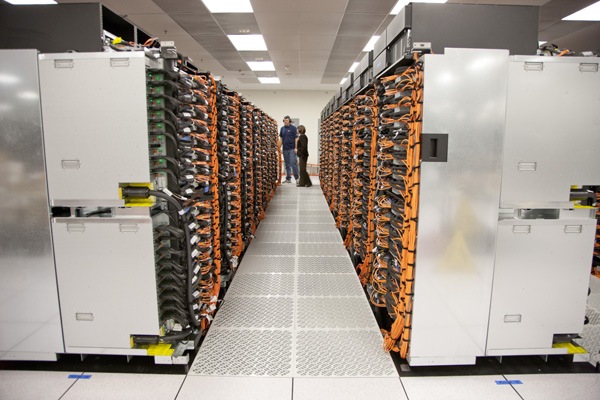
the norm. Currently, IBM Sequoia, shown in the below picture, is the fastest publicly known supercomputer in the world. It has a peak speed of 16.32 petaflops (1 petaflop=a thousand trillion floating point operations/sec) and is about 2 million times faster than a 1980s supercomputer!
How many secret supercomputers, run by various governments and organizations, exist? We can only speculate about that.

Kenneth G. Lieberthal, a China expert at the Brookings Institution, recently gave the public a unique insight into what, at first, may sound like something out of a James Bond movie, but is nothing more than standard operating procedures for officials at U.S. government
agencies, research groups and companies that do business in China and
Russia, when he told the N.Y Times that while working in China, he disables Bluetooth and WI-FI, never lets his phone out of his sight and, in meetings, not only turns off his phone but also removes the battery, for fear his microphone could be turned on remotely. He connects to the Internet only through an encrypted, password-protected channel and copies and pastes his password from a USB thumb drive. He never types in a password directly, because, he said, “the Chinese are very good at installing key-logging software on your laptop.
With daily headlines reminding us about people getting their Email accounts hacked, governments mapping their own citizen's Internet activities and companies losing millions to online intruders from foreign countries and with , we can fully appreciate the need for a secure password, a secure computer that cannot be cracked and an Internet connection allowing you to stay truly anonymous.
Now, are you ready to truly maximize security on your computer ?
Good! There are quite a few important things that you need to do - but don't worry - we'll to guide you through it all!
1. The very first thing you should do is to install ESET Smart
Security 6.0.2 or higher from http://www.eset.com/
ESET Smart Security includes an
antivirus program, a firewall, spam protection, anti spyware and "Anti-theft", the latter a product that can help you localize your computer or device in case of loss or theft. After installation, set the ESET firewall to
“interactive learning mode” and run a full computer scan for viruses and trojans. After this is all done, please
run the LeakTest program, a very simple but spot-on tool to test the very basic
security of your firewall. It should say “Unable to
connect” when you do the leak test so if your computer can connect to the
Leaktest program, then your firewall is definitely not correctly set up. You can download LeakTest for FREE at http://www.grc.com/lt/leaktest.htm


2. Install "KeePass" which is a password manager for
Windows, Linux, Mac OS X and mobile devices, allowing you not only to generate secure passwords but to store all your
passwords in an encrypted database, locked with a
master password or key file. KeePass uses AES and Twofish to ensure a very strong encryption.
You can download KeePass for FREE at http://keepass.info/ 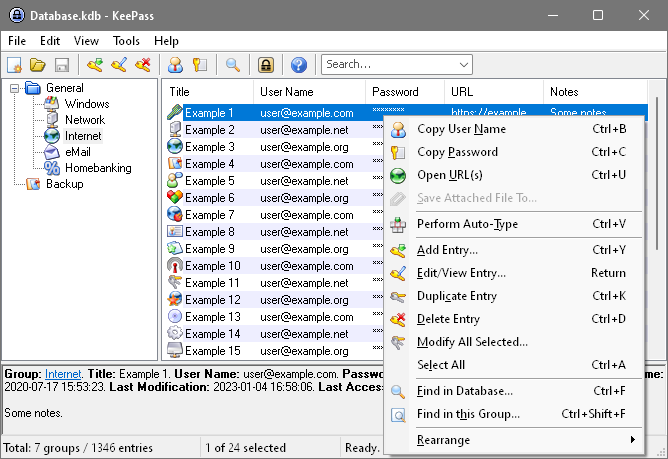 If you allow applications to save your passwords, anyone with physical access to your computer can decode them unless you're properly encrypting them—and chances are pretty good you're not.KeePass supports a protection against guessing and dictionary attacks. You can't really prevent these attacks since nothing prevents an attacker to just try
all possible keys and look if the database decrypts. But what KeePass does is to make it much harder to perform an attack.
If you allow applications to save your passwords, anyone with physical access to your computer can decode them unless you're properly encrypting them—and chances are pretty good you're not.KeePass supports a protection against guessing and dictionary attacks. You can't really prevent these attacks since nothing prevents an attacker to just try
all possible keys and look if the database decrypts. But what KeePass does is to make it much harder to perform an attack.
While KeePass is running, sensitive data like the hash of the master key and entry passwords is stored encrypted in process memory which means that even if you would dump the KeePass process memory to disk, you couldn't find the passwords.
When locking the workspace, KeePass closes the database file and only remembers the last view settings which provides maximum security. Unlocking the workspace is as hard as opening the database file the normal way. Also, it prevents data-loss since the computer can crash while KeePass is locked, without doing any damage to the database
To generate passwords with KeePass is easy. Generation based on character sets is the recommended way to generate random passwords. Other methods should only be used if passwords must follow special rules or fulfill certain conditions. Generation based on a character set is very simple. You simply let KeePass know which characters can be used (i.e. upper-case letters, digits, ...) and KeePass will randomly pick characters out of the set.
After you have created a password that YOU feel comfortable using and that serves YOUR needs, you might want to find out just how secure your password really is by visiting http://www.howsecureismypassword.net/HSIMP uses JavaScript, a client side language, making sure all the calculations are performed by your computer and on your computer, meaning that once you've loaded the site in your browser nothing else will pass between your computer and the server - nothing you type in leaves your computer. If you'd like to check this manually you can simply load the website and then turn off your internet connection - everything will still continue to work.
3. The next thing you would want to take a look at is a must-have software called "KeyScrambler". This program prevents others from seeing (intercept) what you write on your computer, be it a logon password or text in a word document, by encrypting everything you type - LIVE in REAL-TIME. http://www.qfxsoftware.com/download.htm


Instead of hackers, colleagues or curious neighbours being able to read something you just typed (e.g. “my password is 123456”)
by sniffing your network or installing a physical key logger on your computer, all they will see is something like 7^%&0_z7*HXkx!ss3,
which obviously doesn't mean anything, it's just TOTAL RANDOM
nonsense that is virtually impossible to decrypt for outsiders that are
listening to, or recording, LIVE data transmission.


Law Enforcement
Agencies (LEA), too, can install key loggers on people's computers to find out
passwords and intercept communications between people. As a matter of fact, doing so has already
been declared totally LEGAL for them to do and it has already been
done to thwart PGP and Hushmail. Read more at:
http://www.techrepublic.com/blog/security/keyscrambler-how-keystroke-encryption-works-to-thwart-keylogging-threats/4648
http://news.cnet.com/Police-blotter-Judge-questions-Patriot-Act-bugs/2100-1030_3-5933424.html or http://news.cnet.com/8301-10784_3-9741357-7.html
Below is further reading about PGP/encryption and how LEA used key loggers to snare reputed mobster Scarfo:
http://epic.org/crypto/scarfo/opinion.html
http://www.wired.com/politics/law/news/2001/07/45730
http://www.nytimes.com/2001/08/25/technology/25CODE.html
Once installed you may want to tweak the configuration a bit. Right click the KeyScrambler logo in your system tray and choose "Option". In the menu that pops up, please make sure you configure the settings as shown below.
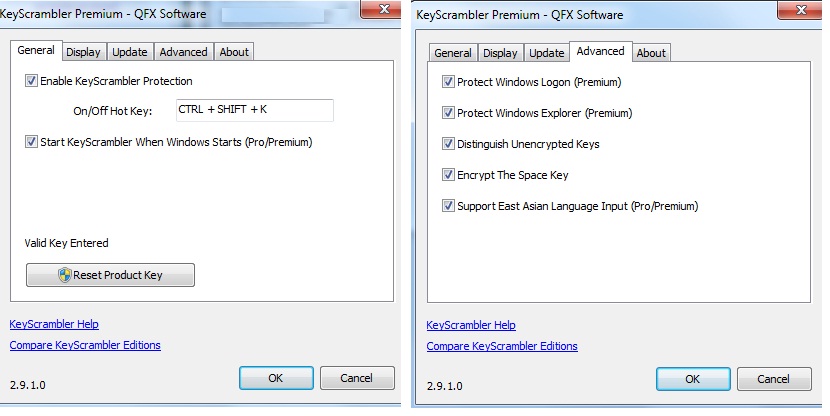
The Premium version is significantly better than all other versions since it protects your Windows logon and supports programs such as Skype and PGP. There is, however, also a FREE version available which you can download at http://download.cnet.com/KeyScrambler-Personal/3000-2144_4-10571274.html
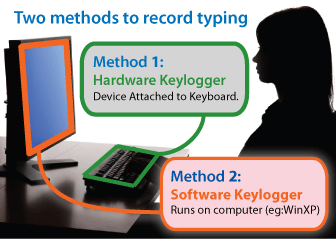
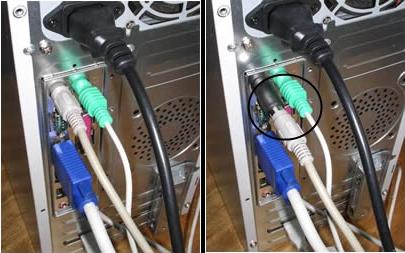
NOTE: Usually keyloggers are software that spies on a computer but there are also PHYSICAL hardware keyloggers as shown in the below two pictures. Governments in countries such as the U.S., China, the U.K, North Korea and Iran have a history of illegally installing hardware keyloggers on computers belonging to both individuals and companies. Keyscrambler can currently not protect you against such devices so please check your computer frequently to ensure no such hardware has been installed without your explicit knowledge.
4. Install TOR (The Onion Router browser/Vidalia) which is a FREE open-source software, FREE to use and the latest version can be downloaded from https://www.torproject.org/download/download-easy.html
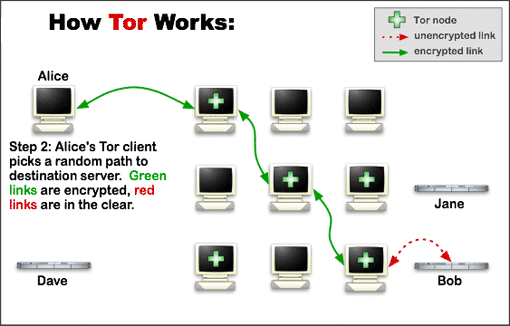
TOR is an open-source toolkit for anonymizing arbitrary IP traffic while traversing the Internet.
TOR uses a mechanism called
“Onion Routing” where TCP streams are broken up and their packets being sent
through a random network of TOR-Servers.
The TOR Browser Bundle requires absolutely NO installation. Just copy the .exe file to the directory where you want to install it and run the file. The TOR Browser Bundle is pre-configured to protect your privacy and anonymity on the web as long as you're browsing with the Tor Browser itself. Almost any other web browser configuration is likely to be unsafe to use with Tor.
The Tor Browser will block browser plugins such as Flash, RealPlayer, QuickTime, and others since they can be manipulated into revealing your IP address. For similar reasons it is not recommended to install additional add-ons or plugins into the Tor Browser, as these may bypass Tor or otherwise harm your anonymity and privacy.
The lack of plugins means
that YouTube videos are blocked by default. To help ensure private
encryption to websites, the Tor Browser Bundle includes HTTPS Everywhere to force the
use of HTTPS encryption with major websites that support it.
5. Install three very important (and FREE) security add-ons for your Mozilla web-browser.
First, visit https://www.eff.org/https-everywhere and download "HTTP(S) everywhere” version 3.1 or higher. Read more about it at https://www.pcworld.com/article/209333/how_to_hijack_facebook_using_firesheep.html
This add-on will prevent people from using nasty tools such as Firesheep etc. to hack your Facebook, Email and so on and makes your every-day surfing much more secure in general. That’s what the “s” in “httpS://” stands for – secure.
Banks, for instance, always use https:// to ensure a secure connection. This ad-on is very easy to use since it basically does everything automatically for you.

Now, install the add-on
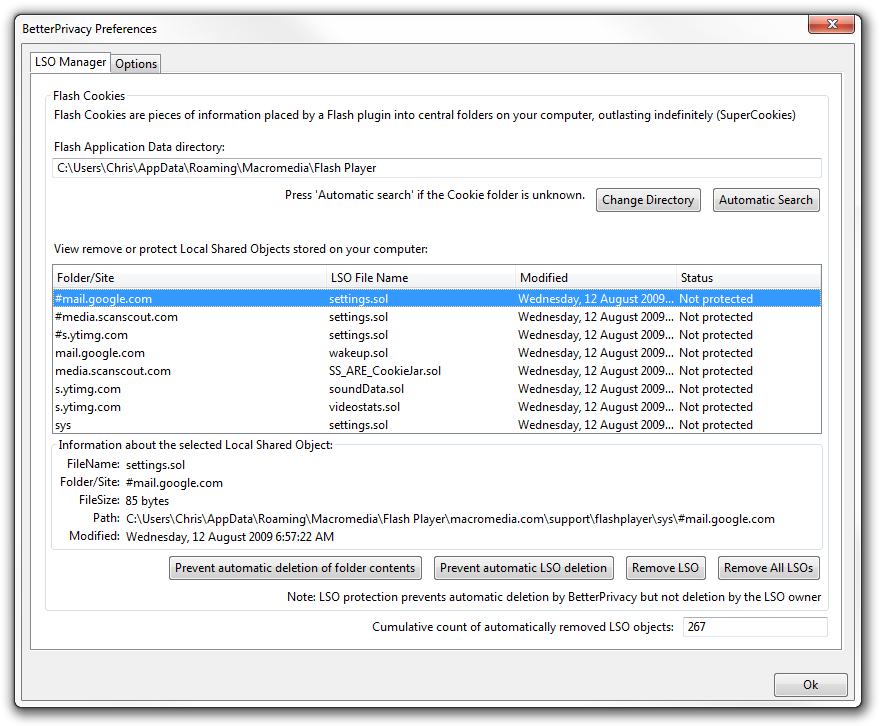
“Better Privacy” which is another great security add-on for Mozilla. It can be downloaded for free at https://addons.mozilla.org/en-US/firefox/addon/betterprivacy/
Better
Privacy protects against "long-term cookies", a new generation of
so called 'Super-Cookies'. This
new cookie generation offers unlimited user tracking to industry and market
research.
The Better Privacy add-on was made to make users aware of those hidden, never
expiring objects and to offer an easier way to view and manage them, since
browsers are usually unable to do that for you.
Finally, install DoNotTrackMe version 2.2.6 or higher for free, by clicking the link below. This FREE add-on also prevents online tracking and improves your security on the Internet. DNTMe blocks hundreds of online trackers on millions of sites, and is rated “Spectacular” by CNET.
https://addons.mozilla.org/en-us/firefox/addon/donottrackplus/
6. Install PGP
version 10.2.1 or higher. It works great on both desktops and
laptops.
http://www.truecrypt.org/ http://www.openpgp.org/ and http://www.jetico.com/encryption-bestcrypt/
PGP is expensive but definitely worth the money, as it lets you, amongst many other things, encrypt Emails, textfiles, or ANY kind
of file(s), making it absolutely unbreakable to anyone, including LEA, if you
choose a 4096 bits encryption key and RSA 256 bits. Just don't
forget to choose a pass-phrase and not a password, to ensure greater security.
So, what’s the difference between a password and a pass-phrase, you ask? A password would be “bodyguard” or “ashtray” but a pass-phrase would look like “!!ThereAreManyCigarettesInThisSmallAshtray!!”.
To ensure that your PGP
software is 100% unbreakable, you must use
the 4096 key and your pass-phrase must be at LEAST 30 characters or more, preferably 50
characters or more and contain numbers, letters AND special characters.
It must be a pass-phrase that
you will NEVER EVER write down anywhere. You must MEMORIZE it to
the extent that you will ALWAYS remember it, just like you always remember your own name, even in woken up the middle of the night.
Never give your PGP pass-phrase out to ANYONE, no matter the situation and no matter who they are, or what they might say. A federal judge in Vermont, U.S., ruled that prosecutors can't force a defendant to divulge his PGP pass-phrase. In another case, they however ruled the opposite. You can read more about it by clicking the two below links:
http://news.cnet.com/8301-13578_3-9834495-38.html?tag=nefd.blgs
http://gcn.com/articles/2012/01/24/agg-laptop-decryption-court-order-ruling.aspx
If
you know that you might be facing severe jail time for something you
did not do, or for something that should not be illegal in a democratic
world where governments respect Internet freedom, ask yourself
what is the consequence of NOT complying to a court-order stating you
MUST give your pass-phrase out? What is the consequence if you actually
DO? Contempt of court vs. the actual conviction? There are limits to the
length of time that a defendant can be held without trial even if they
are imprisoned for contempt. People tend to forget their
passwords all the time now don't they, so if you would too, especially under the stress of facing
serious jail time, no one could blame you for forgetting your pass-phrase and they
most certainly won't be able to proof you wrong.
Source: GCN (http://s.tt/1axv7)
Source: GCN (http://s.tt/1axv7)
Source: GCN (http://s.tt/1axvPeople forget their
passwords all the time now don't they. If you would too, especially under the stress of facing
possible jail time, we are sure no one will blame you for forgetting your pass-phrase - and they
certainly can’t proof you wrong.
The PGP Corporation is the only commercial secure-messaging vendor to publish an open-source code for peer review so that customers and cryptography experts can actually validate the product integrity.
This
ensures that there are no "hidden backdoors" for the LEA, or anyone else, to
use. For additional security UN-check “Remember Recent PGP
Zips” under “PGP Zips”>View, in the PGP menu.
PGP WDE uses a 256 bit AES encryption, (equivalent to a 5200-bit RSA key) for maximum protection and is currently impossible to crack, even to governments, military or Law Enforcement Agencies, as long as you choose a strong pass-phrase. You can read more about why PGP WDE is currently impossible to crack, at the Password section of this FAQ.
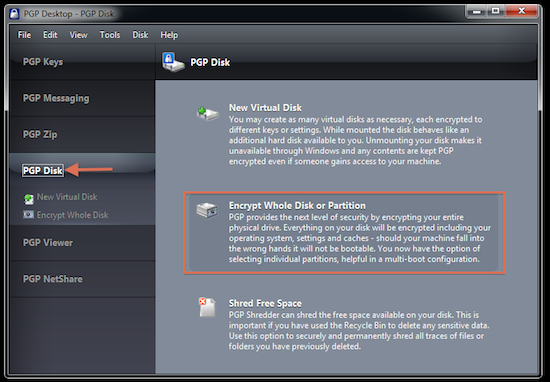
You can download a TRIAL version of PGP WDE from Symantec's official homepage:
http://www.symantec.com/whole-disk-encryption
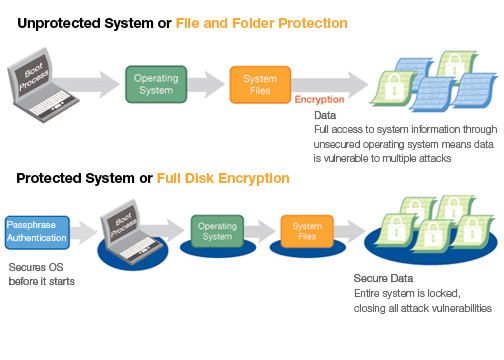
Read more about PGP at http://www.pgp.com/developers/sourcecode/index.html and at https://www.pcworld.com/article/110841/pgp_encryption_proves_powerful.html
7. Install BleachBit, a FREE open-source software allowing you to truly get rid of your entire web browsing history, previously used/viewed files, cookies etc. in just a few clicks. It also allows you to SECURELY delete files, wipe free space and get rid of that nasty index.dat data.
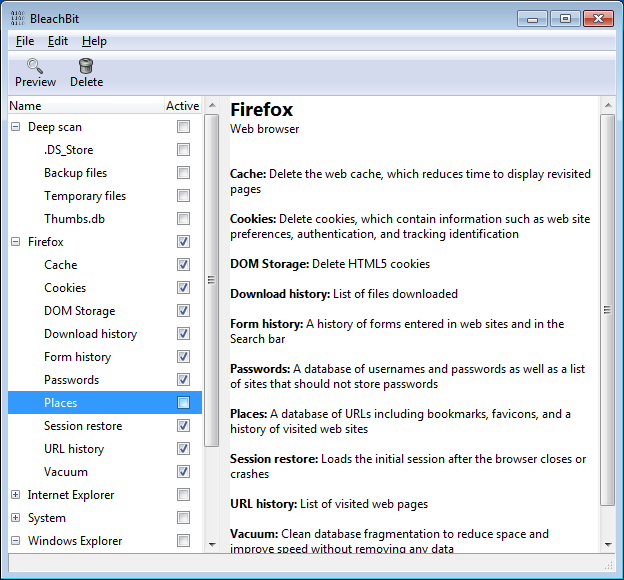
Simply deleting a file and emptying your Recycle
Bin does NOT truly delete the file. All it does is move it to another part of your hard drive and with specially designed software, such as EnCase - the industry standard in computer forensic investigation
technology - it is actually possible to recover almost any file you ever deleted through your recycle bin.
You can read more about deleted files at http://www.geekgirls.com/windows_recycle_bin.htm and by visiting http://www.tech-pro.net/how-to-recover-deleted-files.html
You can download BleachBit for FREE at http://bleachbit.sourceforge.net/
8. Sign up for an Email
account with a provider that offers the possibility to send PGP-encrypted
Emails and allows you to sign up for a FREE account with them without having to fill in any information whatsoever. Hushmail is a LOT more secure and anonymous to use than common
Email providers such as Yahoo, Gmail, and Hotmail. For free services, please visit http://www.cyber-rights.net/
or http://www.hushmail.com
While using this Email service, please make sure that "JAVA applet" temporarily runs in the background, by UN-checking "Always trust content from this publisher" and clicking "Run" as shown in the below picture.
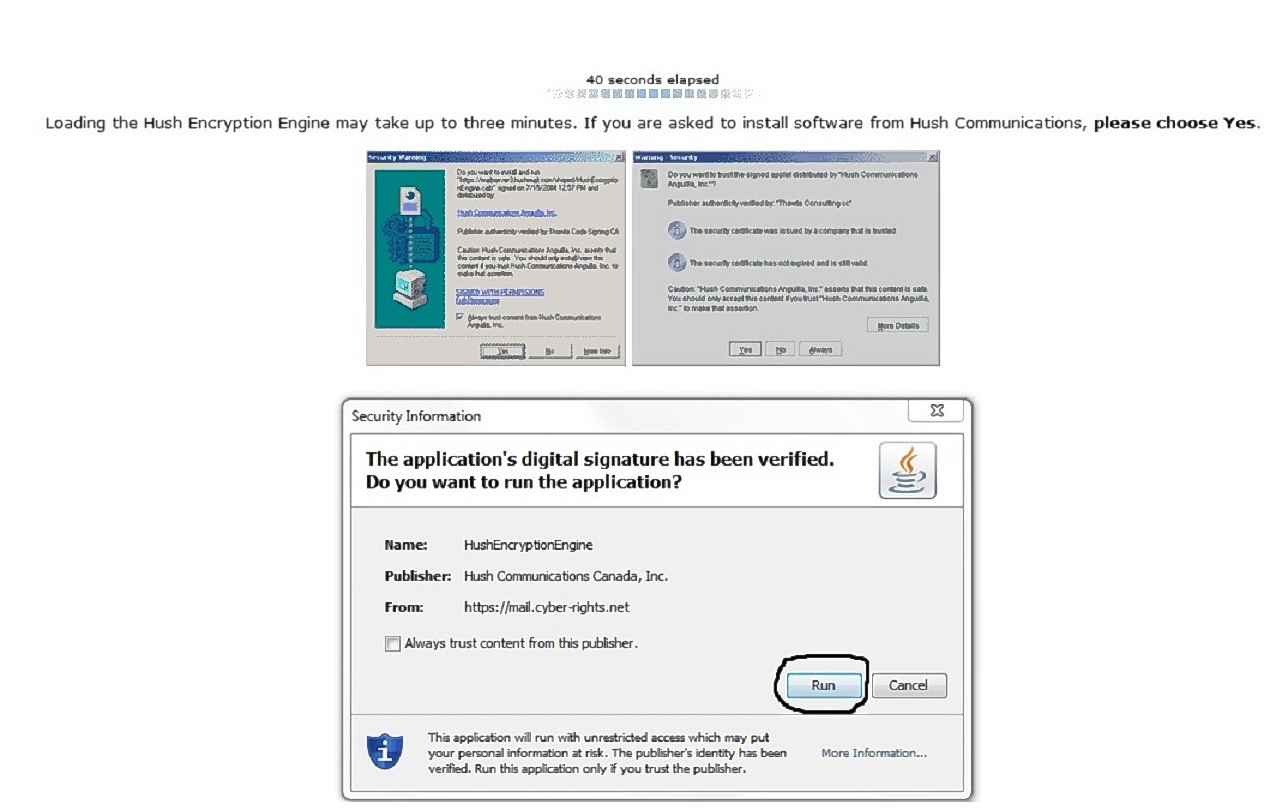
If you do not let the JAVA applet temporarily run in the background, LEA can get your password from the server(s) and doing this has been done before as in the case where LEA got a Canadian court order and Hushmail were forced to turn over 12 (!) CD’s worth of log files.
If this worry you, please understand that if Email providers such as Yahoo, Gmail or Hotmail, will ALWAYS cooperate with LEA and they always keep log files, no matter what YOU do to avoid that. Besides, they don't offer automatic PGP encryption.
Read more at http://www.wired.com/threatlevel/2007/11/encrypted-e-mai/ and at
http://arstechnica.com/security/news/2007/11/secure-hushmail-can-still-talk-to-the-feds.ars
You can read more about JAVA at: http://www.java.com/en/download/faq/whatis_java.xml
Please make it a habit never to share or list your true Email at public websites. If providing a website with an Email is a must, to leave comments or participate at an online forum, it's much better to sign up for a new Email account that you will use only for that purpose and give your true Email address out only to friends, family or close colleagues.Note: Please make sure your JAVA is always updated.
http://it.tmcnet.com/topics/it/articles/2013/01/15/322864-oracle-fixes-massive-java-security-breach.htm
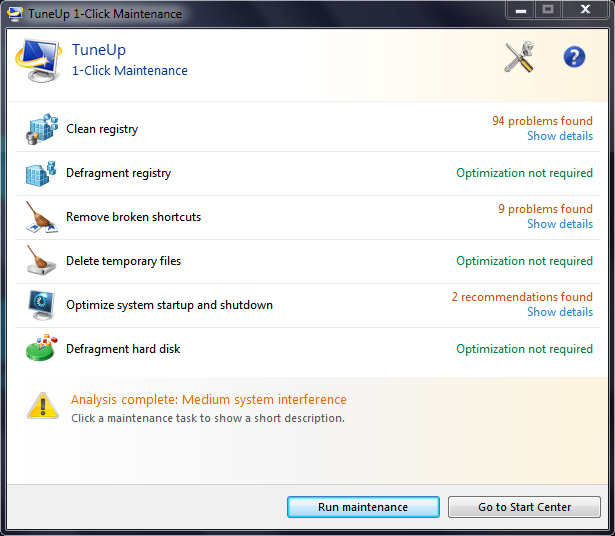
9. Install the excellent program Tune Up Utilities 2013.
Tune Up Utilities is a TRULY recommended software, not only for security reasons, but mostly to keep your computer stable and operating without problems. Please read more at http://www.tune-up.com

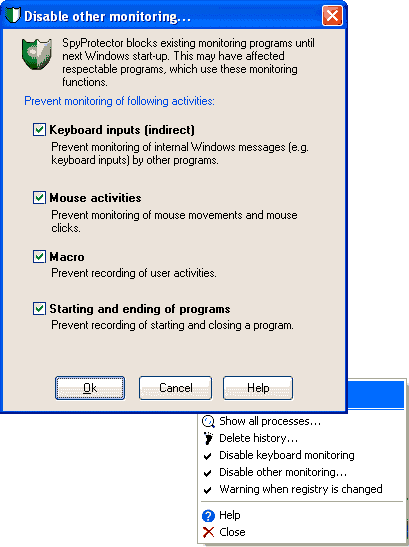
10. Now, install a software called "Security Taskmanager & Spy Protector" - version 1.6 or higher. This software is similar to your ordinary task-manager which is included in Windows for free, but offers more details on the programs running on your computer and includes hints as to just how dangerous some of the current running processes on your computer are. The Spy Protector allows you to instantly be warned when the registry on your computer has been changed and blocks, if selected in the options menu, snooping on your keyboard inputs, mouse activity, "start and end" of programs as well as macro. You can download Security Taskmanager & Spy Protector from http://www.neuber.com/taskmanager

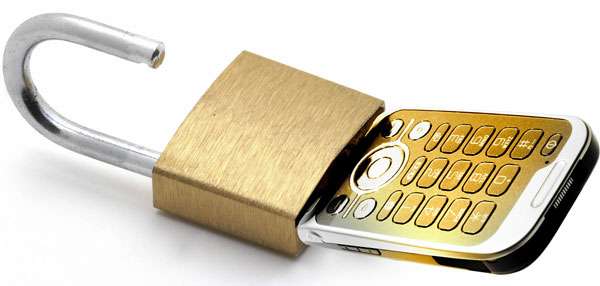
11. Cell phones and Internet security. More and more people realize the need to stay safe on a computer, but very often overlook the same need when on cell phones. If you own a cell phone and most likely you do, you will sooner or later want to connect to the Internet. But how to stay safe on the Internet while using a cell phone?
Now, If you are in law enforcement with a top-secret clearance, then you probably have a dedicated piece of hardware to keep your calls secret. Or do you? The F B I and Scotland Yard recently had their conversations not only intercepted by hacker collective Anonymous but stood helpless when the conversation was published in public and mentioned at news. https://www.youtube.com/watch?v=x_4fKWgouPs
What if you are a chief financial officer and need to talk with someone about which programs are getting cut in the new budget cycle, or a human resources director who needs to chat about employee benefits, or a congressional aide who has to discuss some back-channel deal? Just because a conversation isn’t top-secret doesn’t mean it’s not sensitive in nature. Not being secret doesn't mean it should be open to the public. Cellcrypt Mobile is a downloadable application that runs on off-the-shelf cell phones such as Android, BlackBerry, iPhone and Nokia smartphones and uses government-grade security for protecting sensitive voice calls against interception. To make a call, users simply open the Cellcrypt Mobile application by selecting the icon on their phone, manually enter a Cellcrypt secure number (or select a contact from the Cellcrypt address book) and press send. Cellcrypt Mobile uses encryption algorithms that are recommended for military and government secure communications and its secret keys never leave the mobile device. The product has been tested by third parties and validated to several government standards for its cryptography.
The fact that conversations on cell phones can EASILY be tapped is nothing new to security experts:https://www.nytimes.com/2011/12/26/technology/26iht-hack26.html?pagewanted=all https://www.computerworld.com/s/article/9142819/Hackers_show_it_s_easy_to_snoop_on_a_GSM_call?taxonomyId=16&pageNumber=1
http://news.cnet.com/8301-13578_3-10453214-38.html
http://www.telegraph.co.uk/technology/news/9058529/Satellite-phone-encryption-cracked.html
Cellcrypt is, however, VERY EXPENSIVE to use and unless you happen to be one of those clients Ian Mekin, Cellcrypt's vice president of marketing, refers to when he told media in a recent interview that "Cellcrypt's customers tend to not be very price sensitive, as security takes priority for people in industries such as mining or who are celebrities.", you may want to look at alternative ways to make secure calls such as RedPhone by "Whisper Systems" which offers FREE end-to-end encryption for your calls, securing your conversations so that nobody can listen in. Now, Whisper Systems apps aren’t the first to bring encrypted VoIP to smartphones, but apps like Skype and Vonage don’t publish their source code, leaving the rigor of their security largely a matter of speculation, where the most likely reason would be that they are subject to the Communications Assistance for Law Enforcement Act which requires companies to build back-doors into their technologies for law enforcement wiretaps.
If you need a service offering you the possibility to send FREE encrypted text messages from your phone, simply download CryptoSMS from http://www.cryptosms.com/download.html CryptoSMS allows you to send text messages that are encrypted not once, not twice but three times using Blowfish over ARC4 over 3IDEA and like we said before, it is indeed FREE to use! http://cryptosms.org/csms_installationguide_en_v04.pdf
To be on the safe side, install ESET Mobile Security, a program delivering real-time and on-demand protection of all information and communications on your cell phone, including WI-FI, Bluetooth, GPRS, EDGE and Infrared. It also allows you to locate your lost or stolen phone on a map and has a built-in firewall, amongst many other features. You can download it from http://www.eset.com/us/home/products/mobile-security/

