PASSWORDS - how to recover them, create truly secure ones and store them safely:
Every time you allow an application to save your password, anyone with physical
access to your computer could in theory decode them- unless you are properly encrypting
them—and chances are pretty good you are not.
Pretty much all applications that requires you to login to something will also provide you with an option to save your password and once you've done that, your password may as well be plain text.word may as well be plain text. Even if the
application itself encrypts the account information, it's doing so with a
static key that can be easily decrypted through reverse
engineering and there are plenty of utilities available on the Internet to recover those passwords.
It doesn't even matter that much if you're using an advance Windows password since anybody with physical access to your computer can just use an Ubuntu Live CD to copy all of your data onto an external drive without modifying anything and then crack your files on another computer whenever they please. They could also use tools like OphCrack which is an open-source Windows password cracker, to figure out your password, or they could just use the System Rescue CD to have your Windows password changed. You can download OphCrack for FREE at http://ophcrack.sourceforge.net/


Once an outsider gets access to your files, he or she can easily recover ALL of your passwords from WI-FI, Mozilla, Chrome or any number of other applications. That's right, your favorite open-source instant messenger client Pidgin, for instance, stores all your passwords in plain text. Just open up your %appdata%\.purple\accounts.xml file in your favorite text editor and you'll see your passwords right there for anybody to read.
Have you ever noticed how MSN Messenger, Skype, Yahoo Messenger and pretty much all other software too, for that matter, provide you upon logging in with the option to write your password in text that is hudden behind asterisks so that it will look something like ********? Of course you know that, but did you know that when you choose "Remember my password" and someone else opens up your favorite program, those asterisks can be cracked with a software called "Atomic Asterisk Cracker" and it only takes a SECOND to do so for anyone with physical access to your computer. Not enough people are aware of this, but now that YOU are, please keep this in mind.
Apart from Atomic offering a "Asterisk cracker" they also offer so called "password recovery tools" for applications such as WinZip, WinRAR, PDF, Outlook Express, MSN Messenger and many more. These tools actually crack the software in question which sounds illegal, but since they are cleverly named password RECOVERY tools, they are legal to sell, download and use. http://apasscracker.com/products/
Whether it's legal to actually crack someone else's passwords or not is, however, a slightly different story. People are victims of all kinds of attacks every day, after all, especially brute force attacks.


- First character: lower case letters (26) + upper case letters (26) + numbers (10) = 62 permutations
- Second character: same = 62 permutations
- Total permutations = 62*62 = 3844
Now, 3844 permutations may SOUND like quite a lot, but it's nothing. Even on a very old Pentium 1 computer it would take only 0.3 seconds, literally speaking, to crack a two character password. By looking at the example above, you can see that the longer the password, the more "guesses" and time are needed for the brute force attack to be successful. To cut down on the time it takes to find the correct password, the cracking algorithm will look for popular patterns in words. For instance, if the password is “millford”, the following will be tried first:
- millford
- Millford
- MILLFORD
- How long the password is.
- How many characters are allowed in each position (uppercase, lowercase, numbers, special characters).
The HowSecureIsMyPassword (HSIMP) website was recently updated and is looking better than ever. One of the new features is that you can manually insert exactly how many calculations per second the "attacking computer" should handle. By default the value is set to 4 billion calculations per second. Note: A supercomputer made in 2013 can handle 16 quadrillion calculations per second.
HSIMP uses JavaScript, which is a client side language and all the calculations are performed by your computer - on your computer. This means that once you've loaded the site in your browser nothing else will pass between your computer and the server - nothing you type in leaves your computer. If you'd like to check this you can load the site and then turn off your internet connection - everything will continue to work. If you wonder why the site doesn't use https, that's because no information is passed between your computer and the server, so there's nothing that needs to be encrypted.
HSIMP allows you to find out how long it would take a modern computer with 8 processors (octo-core) and 8 GB of DDR3 RAM memory, to crack your current passwords with a brute force attack. As described in the "Basic & Advanced Security" section of this FAQ, a password like ”darren” would take not more than 1 second to crack while the much more complex password ”Land3rz” would take less than 1 second to crack on a so called supercomputer. The significantly more complex password ”B33r&Mug”, containing both upper case and lower case letters as well as numbers and special characters would take less than 45 seconds to crack on a modern supercomputer.As you can see at How Secure Is My Password, "Land3rz" would take approximately 14 minutes to crack and "B33r&Mug" would take roughly 3 days to crack, if using a octo-core home computer
This shows that there is a TREMENDOUS difference between a "regular" attack, performed by someone using yours or theirs home computer performing a brute force attack and an "advanced" attack performed by an organization, government, LEA or a hacker group since they would have the know-how AND the financial means to use a supercomputer to crack your passwords. Keep in mind that supercomputers could, in theory, be in every man's home after the discovery that regular graphic cards with their computing powers are a great tool not only for playing computer games, but also for performing high-speed brute force attacks - providing that you know what you're doing.

As explained earlier in the "Basic & Advanced Security" section of this FAQ, a supercomputer is a computer at the very front-line of current processing
capacity, particularly when comes to speed of calculation. Supercomputers are the
crowning achievement of the digital age. Yes, it's true that
yesterday's supercomputer is today's game console, at least as far as performance
goes. But there is little doubt that during the past 50 years these
machines have driven some fascinating if esoteric pursuits: breaking
codes, predicting the weather, modeling car crashes, simulating
nuclear explosions, and designing new medicines—to name just a few. In
recent years, supercomputers have shaped our daily lives more directly. Most people rely on them every time they do a Google search or try to find an
old high school chum on Facebook, for example. And you can scarcely
watch a movie nowadays without seeing supercomputer-generated special
effects.
While the
supercomputers of the 1970s used only a few processors, in the 1990s machines
with thousands of processors began to appear. Today massively parallel
supercomputers with tens of
thousands of "off-the-shelf"
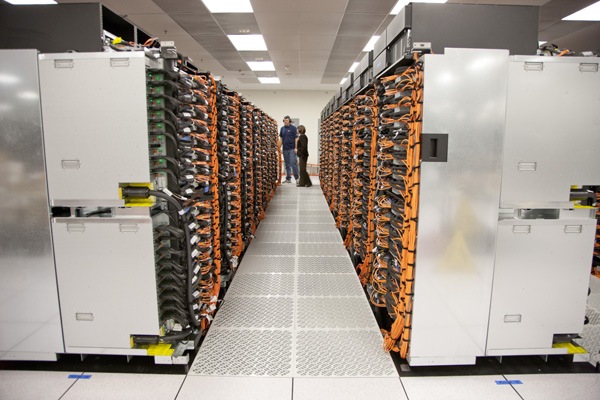
processors is the norm. Currently, IBM Sequoia, shown below, is the fastest publicly known supercomputer in the
world.
It has a peak speed of 16.32 petaflops (1 petaflop=a thousand trillion floating point operations/sec) which is more than 2 MILLION times faster than a decent supercomputer of the 1980s!
How many secret supercomputers, run by various governments and organizations, exist? We can only speculate about that.

Kenneth G. Lieberthal, a China expert at the Brookings Institution, recently gave the public a unique insight into what, at first, may sound like something out of a James Bond movie, but is nothing more than standard operating procedures for officials at U.S. government agencies, research groups and companies that do business in China and Russia, when he told the New York Times that when traveling he leaves his cellphone and laptop at home and instead brings “loaner” devices, which he erases before he leaves the United States and wipes clean the minute he returns. In China, he disables Bluetooth and WI-FI, never lets his phone out of his sight and, in meetings, not only turns off his phone but also removes the battery, for fear his microphone could be turned on remotely. He connects to the Internet only through an encrypted, password-protected channel and copies and pastes his password from a USB thumb drive. He never types in a password directly, because, he said, "the Chinese are very good at installing key-logging software on your laptop".


In the same New York Times article (published on February 11, 2012, page A1 of the New York edition with the headline: Traveling Light in a Time of Digital Thievery) McAfee, the security company, said that if any employee’s device was inspected at the Chinese border, it could never be plugged into McAfee’s network again. Ever. "We just wouldn’t take the risk," said Simon Hunt, a vice president.
Federal lawmakers are considering bills aimed at thwarting cybertheft of trade secrets, although it's currently unclear whether this legislation would directly address problems that arise from business trips overseas. In the meantime, companies are leaking critical information, often without realizing it. “The Chinese are very good at covering their tracks,” said Scott Aken, a former F.B.I. agent who specialized in counterintelligence and computer intrusion. “In most cases, companies don’t realize they’ve been burned until years later when a foreign competitor puts out their very same product — only they’re making it 30 percent cheaper.”

 With daily headlines reminding us about people getting their Email accounts hacked, governments mapping their own citizen's Internet activities and companies losing millions to online intruders from foreign countries, we can fully appreciate
the need for a secure password, a secure computer that cannot be
cracked and an Internet connection allowing you to stay truly anonymous.
With daily headlines reminding us about people getting their Email accounts hacked, governments mapping their own citizen's Internet activities and companies losing millions to online intruders from foreign countries, we can fully appreciate
the need for a secure password, a secure computer that cannot be
cracked and an Internet connection allowing you to stay truly anonymous.
One
good option allowing you not to worry so much about all of the above,
is to not store your passwords at all and instead memorize all of your
passwords. If you, however, feel you must store them (and most people
do, no matter what they say) at least use a password manager, with a great master password to protect the rest of your saved passwords. If you use an easy password
for your password manager, it would be easy to crack it with a brute force
attack.
Combine the use of a password manager with encrypting your entire hard drive with PGP's Whole Disk Encryption (WDE) or a similar WDE software. You will be prompted for a password every time you boot, but you can relax
knowing that anything and everything you ever do on your computer will be encrypted, even cookies and even if you use scripts
with your passwords stored in plain text.
PGP WDE uses a 256 bit AES encryption, (equivalent to a 5200-bit RSA key) for maximum protection and is
currently impossible to crack, even to governments, military or Law Enforcement Agencies, as long as you choose a strong pass-phrase. So how long would it take in theory to crack AES 256 given enough time and resources? The number of steps required to crack just the AES-128 is an 8 followed by 37 (t h i r t y s e v e n) zeroes. To put this into perspective: on a trillion machines, that each could test a billion keys per second, it would take more than two billion years to crack an AES-128 key. Breaking a symmetric 256-bit key by brute force requires 2 ' 128 times more computational power than a 128-bit key.
50 supercomputers would be required to process the necessary operations and 3×1051 years (3,402,823,669,209,384,634,633,746,074,317,682,114 ,560,000,000,000,000,000,000,000,000,000,000,000,000, 000,000,000,000,000 years or roughly equal to the number of atoms in the Milky Way galaxy) would be needed to crack a 256-bit key.
When deciding what password to use, depending on your security needs of course,
you might want to consider generating a custom sized password containing lower
case letters, numbers, upper case letters AND special symbols, mixed together
completely randomly. If you need help doing this just visit http://www.kurtm.net/wpa-pskgen/ a website which, similar to the How Secure Is My Password website mentioned earlier, uses JavaScript, meaning that once you've loaded the site in your browser nothing else will
pass between your computer and the server - nothing you type in leaves
your computer.
Instead of using a password, however, it is STRONGLY recommended that you use a pass-phrase.
So, what is a pass-phrase then, you ask?
The great majority are familiar with restricting access to computer systems via a password, which is a unique string of characters that a user types in as an identification code. A pass-phrase is a longer version of a password and is, in theory, a more secure one. Typically composed of multiple words, a pass-phrase is more secure against standard dictionary attacks, wherein the attacker tries all the words in the dictionary in an attempt to determine your password.
Whereas a password may be “bodyguard” or “ashtray” a pass-phrase would look something like this: “!!ThereAreManyCigarettesInThisSmallAshtray!!” or perhaps "!Passphrases!Are!Good!4!You!" but it could also look like the one in the following example "@The Random Name I looked Up In The Phone-book Was John Anderson2012@". Note the "space" repeatedly used, for increased security.
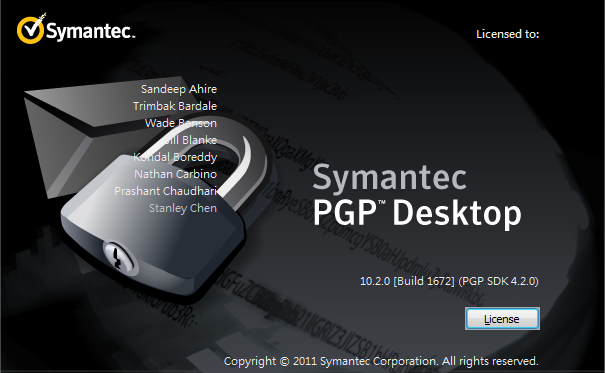
To ensure that your PGP
software is 100% unbreakable, you must use
the 4096 key and your pass-phrase must be at LEAST 30 characters or more, preferably 50
characters or more and contain numbers, letters AND special characters.
To install PGP Whole Disk Encryption, simply click “PGP Disk” in the menu
and choose “Encrypt Whole Disk”. PGP WDE is
impossible to crack, even to governments, military or Law Enforcement Agencies, as long as you choose a really strong pass-phrase. Even if LEA eventually might crack certain encryptions that are considered impossible to crack today, by the time they have done that, something else - something stronger and much better - will be out there.
NEVER EVER give your PGP pass-phrase out to ANYONE, no matter the situation and no matter who they are, or what they might say. A federal judge in Vermont, U.S., ruled that prosecutors can't force a defendant to divulge his PGP pass-phrase. In another case, they however ruled the opposite, so there is no way of truly knowing what the law says on the matter where YOU live until something actually happens and you are brought to trial. You can read more about it at: http://news.cnet.com/8301-13578_3-9834495-38.html?tag=nefd.blgs
http://gcn.com/articles/2012/01/24/agg-laptop-decryption-court-order-ruling.aspx
IF
you know that you might be facing severe jail time for something you
did NOT do, or for something that SHOULD NOT be illegal in a democratic
world where governments actually respect Internet freedom, ask yourself
what is the consequence of not complying to a court-order stating you
MUST give your pass-phrase out? What is the consequence if you actually
DO? Contempt of court vs. the actual conviction? There are limits to the
length of time that a defendant can be held without trial even if they
are imprisoned for contempt.
People forget their
passwords all the time now don't they. If you would too, especially under the stress of facing
possible jail time, we are sure no one will blame you for forgetting your pass-phrase - and they
certainly can’t proof you wrong.
Source: GCN (http://s.tt/1axv7)
Source: GCN (http://s.tt/1axv7)
Source: GCN (http://s.tt/1axvPeople forget their passwords all the time now don't they. If you would too, especially under the stress of facing possible jail time, we are sure no one will blame you for forgetting your pass-phrase - and they certainly can’t proof you wrong.
If you truly follow all advises given in this security guide and if you truly install all software listed in this FAQ, including a firewall, Keyscrambler, WDE and a VPN server and if you choose a strong pass-phrase rather than a password, it is fair to say that unless you are on some kind of "Most Wanted list", you can truly sleep safe and sound at night and you can enjoy your every-day Internet experience to its maximum, without having to worry about whether your credit card details will be gone tomorrow, how many outsiders are intercepting your SMSs and cell phone calls, or whether your private Email account got hacked for the billionth time, for you now know that you got...The Perfect Internet Security setup.
Perfect Internet Security © 2011-2013
